Techarm Blog
Go標準ライブラリだけでWebサーバーを作る - net/httpの基本から実践まで
「Goを勉強し始めたけど、Web開発って何から始めればいい?」「フレームワーク使わなくても大丈夫?」と迷っていませんか?
実は、Go言語の標準ライブラリには本番でも使えるWebサーバー機能が揃っています。GinやEchoを使わなくても、net/httpパッケージだけでWebアプリが作れます。
本記事では、Go標準ライブラリを使ったWeb開発の基礎を一緒に学んでいきましょう。
動作確認環境:
- Go 1.22以上(パターンルーティング機能を使用)
なぜ標準ライブラリから始めるのか
▶Batteries Included思想
Go言語は「Batteries Included(電池付き)」という設計思想を持っています。外部ライブラリなしで多くのことができるという考え方です。
net/httpパッケージだけで、こんなことができます。
- HTTPサーバーの起動・管理
- ルーティング(URLとハンドラーの紐付け)
- リクエスト・レスポンスの処理
- 静的ファイルの配信
▶標準ライブラリを使うメリット
| メリット | 説明 |
|---|---|
| 依存関係が少ない | 外部パッケージ不要でバイナリサイズが小さい |
| 安定性が高い | Go公式チームがメンテナンス |
| 学習効果が高い | HTTPの仕組みを深く理解できる |
| 移行が簡単 | フレームワークへの移行時に基礎知識が役立つ |
僕も最初はフレームワークから入りましたが、標準ライブラリを学び直したことで理解が深まりました。「なぜこの機能があるのか」が分かるようになります。
プロジェクトの準備
この記事では、1つのプロジェクトを段階的に拡張していきます。最終的なディレクトリ構成はこうなります。
myapp/
├── go.mod
├── main.go
├── static/
│ ├── css/
│ │ └── style.css
│ └── js/
│ └── main.js
└── templates/
├── layout.html
├── home.html
└── about.htmlまずはプロジェクトを作成しましょう。
mkdir myapp
cd myapp
go mod init myappStep 1: 最小限のWebサーバー
まずは、最もシンプルなWebサーバーを作ってみましょう。
package main
import (
"fmt"
"net/http"
)
func main() {
http.HandleFunc("/", func(w http.ResponseWriter, r *http.Request) {
fmt.Fprintf(w, "Hello, World!")
})
http.ListenAndServe(":8080", nil)
}実行方法:
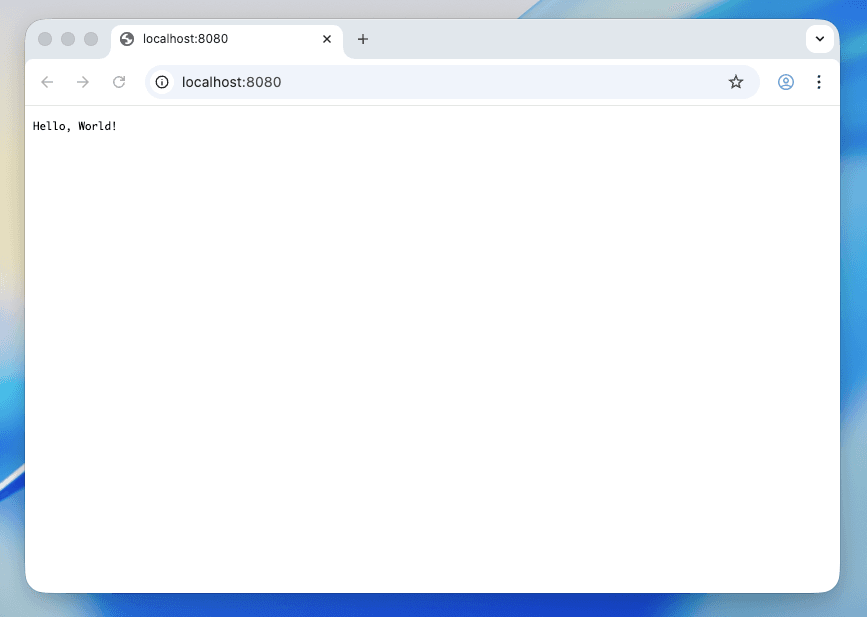
go run main.goブラウザで http://localhost:8080 にアクセスすると、「Hello, World!」が表示されます。
▶コードの解説
http.HandleFunc("/", func(w http.ResponseWriter, r *http.Request) {
fmt.Fprintf(w, "Hello, World!")
})http.HandleFunc: URLパスとハンドラー関数を紐付ける"/": ルートパス(すべてのリクエストにマッチ)w http.ResponseWriter: レスポンスを書き込むためのインターフェースr *http.Request: リクエスト情報を持つ構造体
http.ListenAndServe(":8080", nil):8080: ポート8080でサーバーを起動nil: デフォルトのServeMuxを使用
Step 2: ルーティングを追加
▶パターンルーティング
Go 1.22から、http.ServeMuxでパターンマッチングが使えるようになりました。外部ルーターなしで柔軟なルーティングが書けます。
package main
import (
"fmt"
"net/http"
)
func main() {
mux := http.NewServeMux()
// 基本的なルート
mux.HandleFunc("GET /", homeHandler)
mux.HandleFunc("GET /about", aboutHandler)
// パスパラメータ
mux.HandleFunc("GET /users/{id}", userHandler)
// HTTPメソッド指定
mux.HandleFunc("POST /users", createUserHandler)
fmt.Println("Server starting on :8080")
http.ListenAndServe(":8080", mux)
}
func homeHandler(w http.ResponseWriter, r *http.Request) {
fmt.Fprintf(w, "ホームページへようこそ!")
}
func aboutHandler(w http.ResponseWriter, r *http.Request) {
fmt.Fprintf(w, "このサイトについて")
}
func userHandler(w http.ResponseWriter, r *http.Request) {
// パスパラメータを取得
id := r.PathValue("id")
fmt.Fprintf(w, "ユーザーID: %s", id)
}
func createUserHandler(w http.ResponseWriter, r *http.Request) {
fmt.Fprintf(w, "ユーザーを作成しました")
}▶書き方
Go 1.22以降では、こんなパターンが使えます。
// HTTPメソッド + パス
mux.HandleFunc("GET /users", listUsers) // GETのみ
mux.HandleFunc("POST /users", createUser) // POSTのみ
// パスパラメータ
mux.HandleFunc("GET /users/{id}", getUser) // {id}で値を取得
mux.HandleFunc("GET /posts/{slug...}", getPost) // {slug...}で残りのパス全体を取得
// 末尾スラッシュ
mux.HandleFunc("GET /api/", apiRoot) // /api/ と /api/xxx にマッチ
mux.HandleFunc("GET /api", apiExact) // /api のみにマッチGo 1.22未満のバージョンでは、"GET /users"のようなメソッド指定やパスパラメータは使えません。go versionで確認してください。
POSTリクエストはブラウザから直接確認できません。ターミナルからcurlコマンドを使いましょう:
curl -X POST http://localhost:8080/usersStep 3: HTMLテンプレートを追加
実際のWebアプリケーションでは、HTMLを返すことが多いですよね。Goにはhtml/templateパッケージが用意されています。
▶テンプレート作成
まず、テンプレート用のディレクトリを作成します。
mkdir templates3つのテンプレートファイルを作成しましょう。最初はインラインスタイルで作成し、Step 4で外部CSSに切り替えます。
<!DOCTYPE html>
<html lang="ja">
<head>
<meta charset="UTF-8">
<meta name="viewport" content="width=device-width, initial-scale=1.0">
<title>{{.Title}}</title>
<style>
body {
font-family: -apple-system, BlinkMacSystemFont, sans-serif;
max-width: 800px;
margin: 0 auto;
padding: 20px;
}
nav { margin-bottom: 20px; }
nav a { margin-right: 15px; }
</style>
</head>
<body>
<nav>
<a href="/">ホーム</a>
<a href="/about">About</a>
</nav>
<main>
{{template "content" .}}
</main>
</body>
</html>{{define "content"}}
<h1>{{.Title}}</h1>
<p>{{.Message}}</p>
{{if .Items}}
<ul>
{{range .Items}}
<li>{{.}}</li>
{{end}}
</ul>
{{end}}
{{end}}{{define "content"}}
<h1>{{.Title}}</h1>
<p>このサイトはGo標準ライブラリだけで作られています。</p>
<h2>使用技術</h2>
<ul>
<li>Go {{.GoVersion}}</li>
<li>net/http</li>
<li>html/template</li>
</ul>
{{end}}▶main.goを更新
Step 2で作成したmain.goを、テンプレートを使うように更新しましょう。
package main
import (
"fmt"
"html/template"
"net/http"
"runtime"
)
func main() {
mux := http.NewServeMux()
// ルート
mux.HandleFunc("GET /", homeHandler)
mux.HandleFunc("GET /about", aboutHandler)
mux.HandleFunc("GET /users/{id}", userHandler)
fmt.Println("Server starting on :8080")
http.ListenAndServe(":8080", mux)
}
func homeHandler(w http.ResponseWriter, r *http.Request) {
tmpl, err := template.ParseFiles(
"templates/layout.html",
"templates/home.html",
)
if err != nil {
http.Error(w, "テンプレートエラー", http.StatusInternalServerError)
return
}
data := map[string]any{
"Title": "Goで作るWebサイト",
"Message": "標準ライブラリだけで作りました!",
"Items": []string{"シンプル", "高速", "安全"},
}
tmpl.Execute(w, data)
}
func aboutHandler(w http.ResponseWriter, r *http.Request) {
tmpl, err := template.ParseFiles(
"templates/layout.html",
"templates/about.html",
)
if err != nil {
http.Error(w, "テンプレートエラー", http.StatusInternalServerError)
return
}
data := map[string]any{
"Title": "About",
"GoVersion": runtime.Version(),
}
tmpl.Execute(w, data)
}
func userHandler(w http.ResponseWriter, r *http.Request) {
id := r.PathValue("id")
fmt.Fprintf(w, "ユーザーID: %s", id)
}▶テンプレート構文の基本
| 構文 | 説明 | 例 |
|---|---|---|
{{.Field}} | フィールドの値を表示 | {{.Title}} |
{{if .Cond}}...{{end}} | 条件分岐 | {{if .Items}}...{{end}} |
{{range .Slice}}...{{end}} | ループ | {{range .Items}}{{.}}{{end}} |
{{template "name" .}} | 別テンプレートを呼び出し | {{template "content" .}} |
{{define "name"}}...{{end}} | テンプレートを定義 | {{define "content"}}...{{end}} |
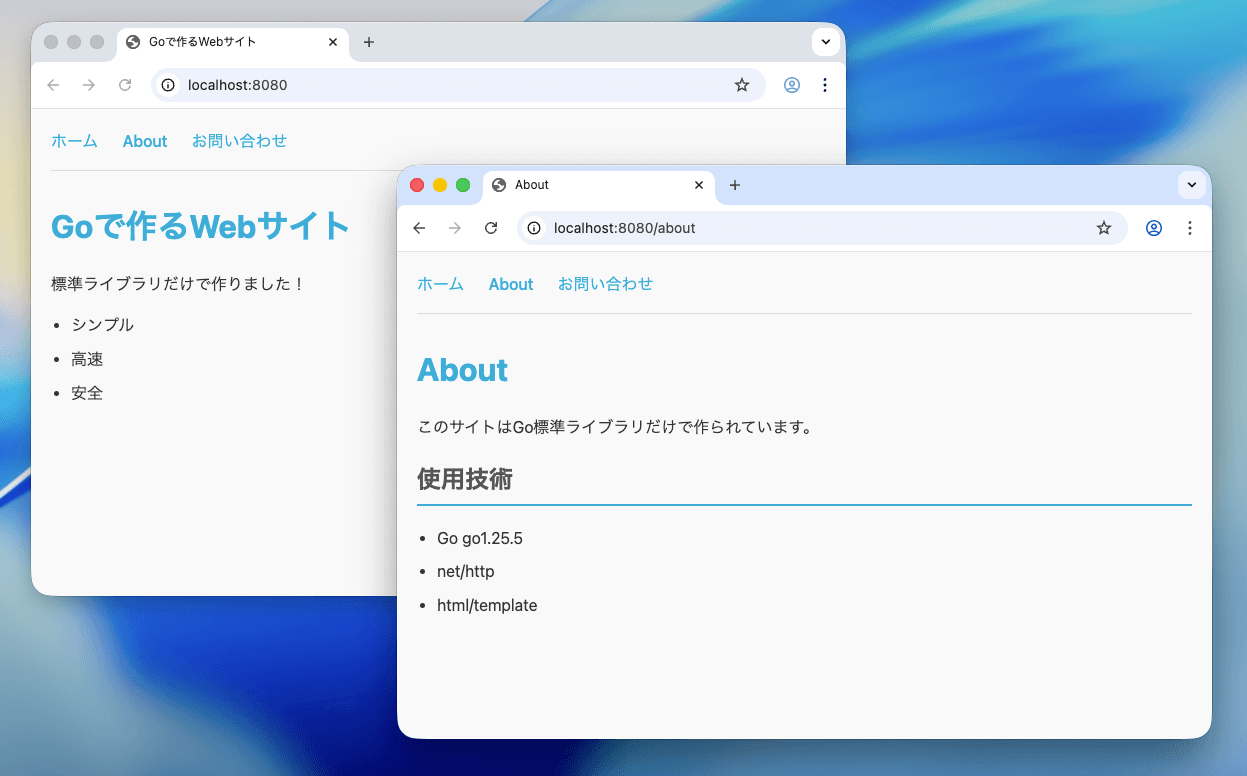
サーバーを起動して、ホームページとAboutページを確認してみましょう。

Step 4: 静的ファイル配信を追加
CSS、JavaScript、画像などの静的ファイルを配信できるようにしましょう。
▶静的ファイルを準備
mkdir -p static/css static/jsconsole.log('Go Web App loaded!');▶静的ファイル配信を追加
Step 3のコードに、静的ファイル配信の設定を追加します。main関数を以下のように更新してください。
func main() {
mux := http.NewServeMux()
// 静的ファイルの配信を追加
fs := http.FileServer(http.Dir("static"))
mux.Handle("GET /static/", http.StripPrefix("/static/", fs))
// ルート(Step 3と同じ)
mux.HandleFunc("GET /", homeHandler)
mux.HandleFunc("GET /about", aboutHandler)
mux.HandleFunc("GET /users/{id}", userHandler)
fmt.Println("Server starting on :8080")
http.ListenAndServe(":8080", mux)
}▶解説
fs := http.FileServer(http.Dir("static"))http.Dir("static"):staticディレクトリをファイルシステムとして扱うhttp.FileServer: ファイルを配信するハンドラーを作成
mux.Handle("GET /static/", http.StripPrefix("/static/", fs))http.StripPrefix: URLから/static/を取り除いてからファイルを探す/static/css/style.cssへのリクエスト →static/css/style.cssを返す
▶layout.htmlを更新
静的ファイルを参照するように、Step 3で作成したtemplates/layout.htmlを更新しましょう。
<!DOCTYPE html>
<html lang="ja">
<head>
<meta charset="UTF-8">
<meta name="viewport" content="width=device-width, initial-scale=1.0">
<title>{{.Title}}</title>
<link rel="stylesheet" href="/static/css/style.css">
</head>
<body>
<nav>
<a href="/">ホーム</a>
<a href="/about">About</a>
<a href="/contact">お問い合わせ</a>
</nav>
<main>
{{template "content" .}}
</main>
<script src="/static/js/main.js"></script>
</body>
</html>CSSが適用されて、見た目が整いました。
Step 5: フォーム処理を追加
最後に、ユーザーからの入力を受け取るお問い合わせフォームを追加しましょう。
▶contact.html作成
他のページと同様に、テンプレートファイルとして作成します。
{{define "content"}}
<h1>{{.Title}}</h1>
<form method="POST" action="/contact">
<p>
<label>お名前:</label>
<input type="text" name="name" required>
</p>
<p>
<label>メールアドレス:</label>
<input type="email" name="email" required>
</p>
<p>
<label>メッセージ:</label>
<textarea name="message" rows="5" required></textarea>
</p>
<button type="submit">送信</button>
</form>
{{end}}▶contactハンドラーを追加
Step 4のコードに、お問い合わせフォーム用のルートを追加します。main関数に以下を追加してください。
// main関数に追加
mux.HandleFunc("GET /contact", contactFormHandler)
mux.HandleFunc("POST /contact", contactSubmitHandler)そして、以下のハンドラー関数を追加します。
func contactFormHandler(w http.ResponseWriter, r *http.Request) {
tmpl, err := template.ParseFiles(
"templates/layout.html",
"templates/contact.html",
)
if err != nil {
http.Error(w, "テンプレートエラー", http.StatusInternalServerError)
return
}
data := map[string]any{
"Title": "お問い合わせ",
}
tmpl.Execute(w, data)
}
func contactSubmitHandler(w http.ResponseWriter, r *http.Request) {
if err := r.ParseForm(); err != nil {
http.Error(w, "フォームの解析に失敗しました", http.StatusBadRequest)
return
}
name := r.FormValue("name")
email := r.FormValue("email")
message := r.FormValue("message")
fmt.Fprintf(w, "ありがとうございます、%sさん!\n", name)
fmt.Fprintf(w, "メール: %s\n", email)
fmt.Fprintf(w, "メッセージ: %s\n", message)
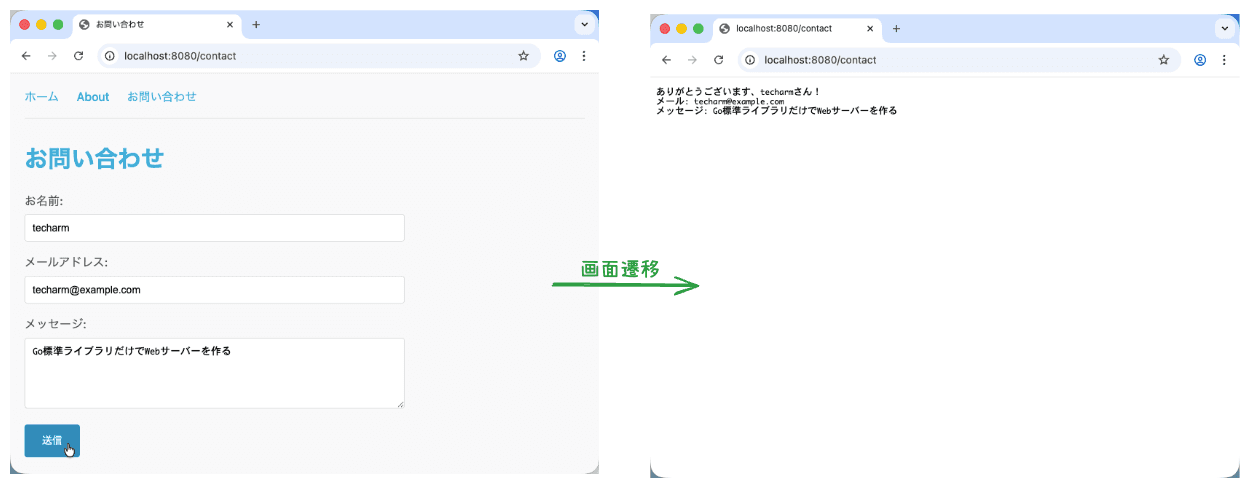
}お問い合わせフォームが完成しました。
▶フォーム処理のポイント
| メソッド | 説明 |
|---|---|
r.ParseForm() | フォームデータをパース(POST必須) |
r.FormValue("key") | フォームの値を取得 |
r.URL.Query().Get("key") | クエリパラメータを取得 |
r.PostFormValue("key") | POSTのみから取得 |
ユーザー入力は必ずバリデーションしてください。この例では簡略化していますが、本番環境では適切な入力チェックが必要です。
Step 6: リファクタリングで整理する
Step 1〜5で作成したコードは動きますが、本番向けにもう少し改善してみましょう。
▶テンプレートの事前読み込み
現在のコードでは、リクエストごとにtemplate.ParseFilesを呼んでいます。
// 改善前:毎回テンプレートを読み込む(非効率)
func homeHandler(w http.ResponseWriter, r *http.Request) {
tmpl, err := template.ParseFiles(
"templates/layout.html",
"templates/home.html",
)
// ...
}起動時に一度だけ読み込むように変更しましょう。
// 改善後:起動時に一度だけ読み込む
var templates *template.Template
func init() {
templates = template.Must(template.ParseGlob("templates/*.html"))
}▶共通関数の抽出
各ハンドラーで同じテンプレート描画処理を繰り返しています。
// 改善前:同じ処理が各ハンドラーに散らばっている
func homeHandler(w http.ResponseWriter, r *http.Request) {
tmpl, err := template.ParseFiles(...)
if err != nil {
http.Error(w, "テンプレートエラー", http.StatusInternalServerError)
return
}
tmpl.Execute(w, data)
}
func aboutHandler(w http.ResponseWriter, r *http.Request) {
tmpl, err := template.ParseFiles(...) // 同じ処理
if err != nil {
http.Error(w, "テンプレートエラー", http.StatusInternalServerError)
return
}
tmpl.Execute(w, data)
}共通関数にまとめましょう。
// 改善後:共通関数に抽出
func renderTemplate(w http.ResponseWriter, tmplName string, data map[string]any) {
err := templates.ExecuteTemplate(w, tmplName, data)
if err != nil {
http.Error(w, "テンプレートエラー", http.StatusInternalServerError)
}
}
func homeHandler(w http.ResponseWriter, r *http.Request) {
data := map[string]any{...}
renderTemplate(w, "layout.html", data) // シンプルに
}▶サーバー設定の強化
http.ListenAndServeではタイムアウトが設定できません。
// 改善前:タイムアウトなし
http.ListenAndServe(":8080", mux)http.Server構造体を使いましょう。
// 改善後:タイムアウト設定
server := &http.Server{
Addr: ":8080",
Handler: mux,
ReadTimeout: 10 * time.Second,
WriteTimeout: 10 * time.Second,
}
log.Fatal(server.ListenAndServe())▶リファクタリングまとめ
| 改善前 | 改善後 | メリット |
|---|---|---|
毎回template.ParseFiles | init()で一度だけ読み込み | パフォーマンス向上 |
| 各ハンドラーで同じ処理 | renderTemplateに共通化 | コードの重複削除 |
http.ListenAndServe | http.Server構造体 | タイムアウト設定可能 |
完成コード
Step 1〜6を適用した最終的なコードです。
完成コードは以下のGitHubリポジトリからダウンロードできます。
▶ファイル構成
myapp/
├── go.mod
├── main.go
├── static/
│ ├── css/
│ │ └── style.css
│ └── js/
│ └── main.js
└── templates/
├── layout.html
├── home.html
├── about.html
└── contact.html▶main.go
package main
import (
"fmt"
"html/template"
"log"
"net/http"
"runtime"
"time"
)
var templates *template.Template
func init() {
templates = template.Must(template.ParseGlob("templates/*.html"))
}
func main() {
mux := http.NewServeMux()
// 静的ファイルの配信を追加
fs := http.FileServer(http.Dir("static"))
mux.Handle("GET /static/", http.StripPrefix("/static/", fs))
// ルート
mux.HandleFunc("GET /", homeHandler)
mux.HandleFunc("GET /about", aboutHandler)
mux.HandleFunc("GET /users/{id}", userHandler)
mux.HandleFunc("GET /contact", contactFormHandler)
mux.HandleFunc("POST /contact", contactSubmitHandler)
log.Println("Server starting on http://localhost:8080")
server := &http.Server{
Addr: ":8080",
Handler: mux,
ReadTimeout: 10 * time.Second,
WriteTimeout: 10 * time.Second,
}
log.Fatal(server.ListenAndServe())
}
func renderTemplate(w http.ResponseWriter, tmplName string, data map[string]any) {
err := templates.ExecuteTemplate(w, tmplName, data)
if err != nil {
http.Error(w, "テンプレートエラー", http.StatusInternalServerError)
}
}
func homeHandler(w http.ResponseWriter, r *http.Request) {
data := map[string]any{
"Title": "Goで作るWebサイト",
"Message": "標準ライブラリだけで作りました!",
"Items": []string{"シンプル", "高速", "安全"},
}
renderTemplate(w, "layout.html", data)
}
func aboutHandler(w http.ResponseWriter, r *http.Request) {
data := map[string]any{
"Title": "About",
"GoVersion": runtime.Version(),
}
renderTemplate(w, "layout.html", data)
}
func userHandler(w http.ResponseWriter, r *http.Request) {
id := r.PathValue("id")
fmt.Fprintf(w, "ユーザーID: %s", id)
}
func contactFormHandler(w http.ResponseWriter, r *http.Request) {
data := map[string]any{
"Title": "お問い合わせ",
}
renderTemplate(w, "layout.html", data)
}
func contactSubmitHandler(w http.ResponseWriter, r *http.Request) {
if err := r.ParseForm(); err != nil {
http.Error(w, "フォームの解析に失敗しました", http.StatusBadRequest)
return
}
name := r.FormValue("name")
email := r.FormValue("email")
message := r.FormValue("message")
fmt.Fprintf(w, "ありがとうございます、%sさん!\n", name)
fmt.Fprintf(w, "メール: %s\n", email)
fmt.Fprintf(w, "メッセージ: %s\n", message)
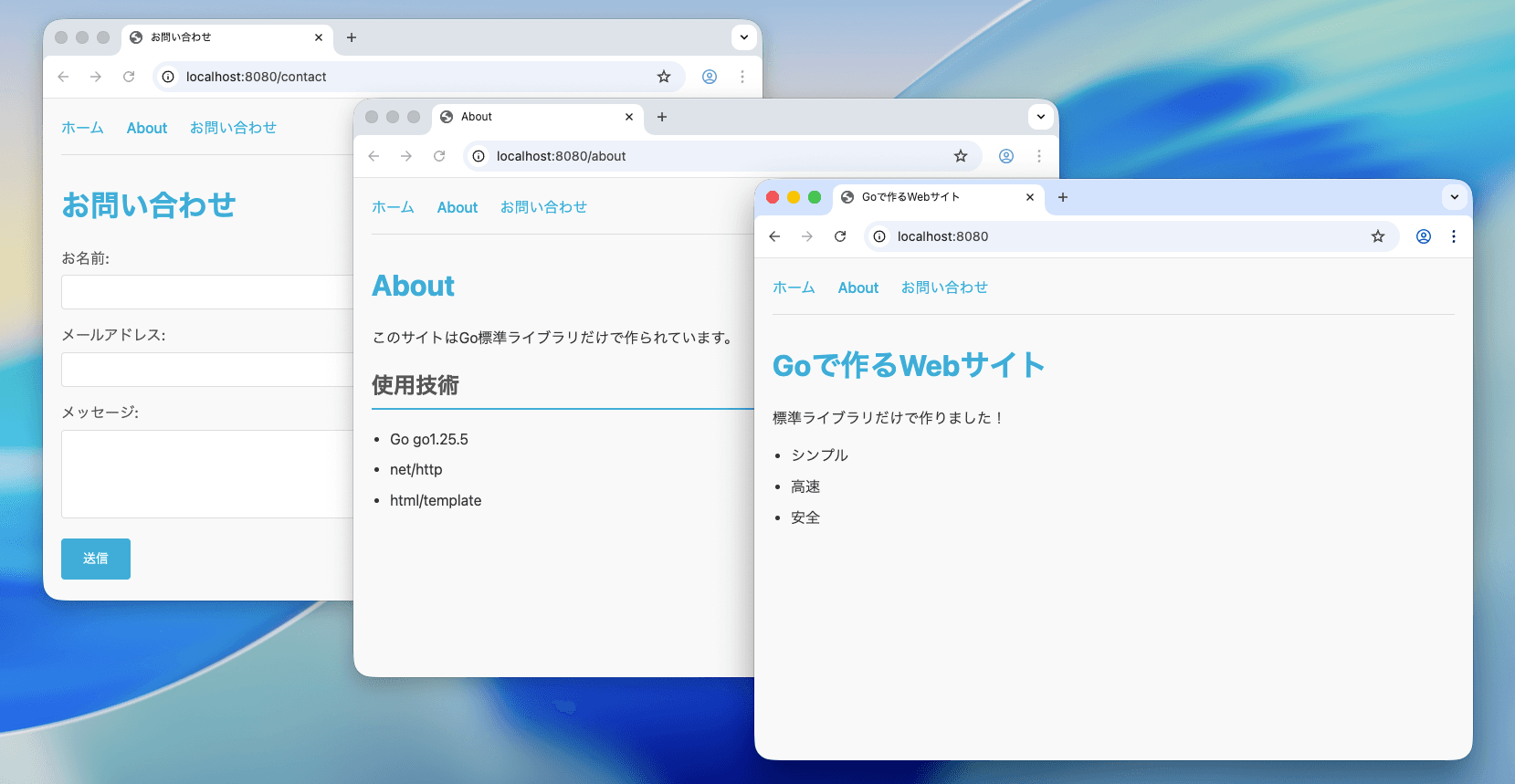
}完成したアプリケーションの画面です。
まとめ
この記事では、Go標準ライブラリnet/httpを使ったWeb開発の基礎を学びました。
学んだこと:
- 最小限のWebサーバーの作り方
- Go 1.22のパターンルーティング
- HTMLテンプレートの使い方
- 静的ファイルの配信
- フォーム処理
標準ライブラリだけでも、けっこういろんなことができますよね。
次回予告: 同じ標準ライブラリを使ってREST APIを構築する方法を解説します。JSONの送受信やCRUD操作の実装を一緒に学んでいきましょう。
▶参考リンク
この記事はいかがでしたか?
もしこの記事が参考になりましたら、
高評価をいただけると大変嬉しいです!
皆様からの応援が励みになります。ありがとうございます! ✨

エンジニア歴10年以上。Rust / Go / React / Python を中心にWeb開発しています。
日々の学びや技術的な知見をこのブログで発信しています。