Techarm Blog
Go標準ライブラリでREST APIを作る - JSONとCRUDの基本
前回の記事では、Go標準ライブラリnet/httpを使ってHTMLを返すWebサーバーを作りました。
今回はJSONを返すREST APIを作っていきます。フロントエンドやモバイルアプリと連携するなら、APIは必須スキルですよね。
僕も最初はJSON処理で「構造体とJSONの変換ってどうやるの?」と戸惑いましたが、標準ライブラリのencoding/jsonを使えば驚くほどシンプルに書けます。
本記事では、コードスニペットを管理するAPIを題材に、JSONの送受信からCRUD操作、テストの書き方まで一緒に学んでいきましょう。
動作確認環境:
- Go 1.22以上(パターンルーティング機能を使用)
- 前回記事の知識があると理解しやすいです
今回作るもの
コードスニペットを管理するREST APIを作ります。
GET /snippets - スニペット一覧取得
GET /snippets/{id} - スニペット詳細取得
POST /snippets - スニペット作成
PUT /snippets/{id} - スニペット更新
DELETE /snippets/{id} - スニペット削除最終的なディレクトリ構成はこうなります。
snippetapi/
├── go.mod
├── main.go
└── main_test.goシンプルに1ファイルで実装して、最後にテストを追加します。
プロジェクトの準備
新しいプロジェクトを作成しましょう。
mkdir snippetapi
cd snippetapi
go mod init snippetapiStep 1: JSONの基本
まずは、GoでJSONを扱う基本を押さえておきましょう。
▶構造体とJSONタグ
GoでJSONを扱うには、構造体にjsonタグをつけます。
package main
import (
"encoding/json"
"fmt"
)
type Snippet struct {
ID int `json:"id"`
Title string `json:"title"`
Code string `json:"code"`
Language string `json:"language"`
}
func main() {
// 構造体 → JSON(Marshal)
snippet := Snippet{
ID: 1,
Title: "Hello World",
Code: "fmt.Println(\"Hello\")",
Language: "go",
}
jsonData, _ := json.Marshal(snippet)
fmt.Println(string(jsonData))
// {"id":1,"title":"Hello World","code":"fmt.Println(\"Hello\")","language":"go"}
// JSON → 構造体(Unmarshal)
jsonString := `{"id":2,"title":"Test","code":"print('test')","language":"python"}`
var s Snippet
json.Unmarshal([]byte(jsonString), &s)
fmt.Printf("%+v\n", s)
// {ID:2 Title:Test Code:print('test') Language:python}
}▶JSONタグのポイント
| タグ | 説明 | 例 |
|---|---|---|
json:"name" | JSONのキー名を指定 | json:"title" |
json:"name,omitempty" | 空の場合は出力しない | json:"description,omitempty" |
json:"-" | JSONに含めない | json:"-" |
Goの構造体フィールドはIDのように大文字始まりですが、JSONではidのように小文字が一般的です。タグで変換しましょう。
Step 2: 最初のAPIエンドポイント
それでは、実際にAPIを作っていきます。まずはヘルスチェック用のエンドポイントから。
package main
import (
"encoding/json"
"log"
"net/http"
"time"
)
func main() {
mux := http.NewServeMux()
mux.HandleFunc("GET /health", healthHandler)
log.Println("Server starting on http://localhost:8080")
server := &http.Server{
Addr: ":8080",
Handler: mux,
ReadTimeout: 10 * time.Second,
WriteTimeout: 10 * time.Second,
}
log.Fatal(server.ListenAndServe())
}
func healthHandler(w http.ResponseWriter, r *http.Request) {
w.Header().Set("Content-Type", "application/json")
response := map[string]string{
"status": "ok",
}
json.NewEncoder(w).Encode(response)
}実行方法:
go run main.go動作確認:
curl http://localhost:8080/health
# {"status":"ok"}▶コードの解説
w.Header().Set("Content-Type", "application/json")レスポンスがJSONであることを示すヘッダーを設定します。APIでは必須です。
json.NewEncoder(w).Encode(response)json.NewEncoderは、データをJSONに変換しながら直接w(ResponseWriter)に書き込みます。json.Marshalしてから書き込むより効率的です。
Step 3: スニペットのCRUD実装
いよいよ本番です。スニペットのCRUD操作を実装していきましょう。
▶データ構造の定義
まず、スニペットの構造体とインメモリストアを定義します。
package main
import (
"encoding/json"
"log"
"net/http"
"strconv"
"sync"
"time"
)
type Snippet struct {
ID int `json:"id"`
Title string `json:"title"`
Code string `json:"code"`
Language string `json:"language"`
CreatedAt time.Time `json:"created_at"`
}
// インメモリストア
var (
snippets = make(map[int]Snippet)
nextID = 1
mu sync.RWMutex
)
func main() {
mux := http.NewServeMux()
mux.HandleFunc("GET /health", healthHandler)
mux.HandleFunc("GET /snippets", listSnippets)
mux.HandleFunc("GET /snippets/{id}", getSnippet)
mux.HandleFunc("POST /snippets", createSnippet)
mux.HandleFunc("PUT /snippets/{id}", updateSnippet)
mux.HandleFunc("DELETE /snippets/{id}", deleteSnippet)
log.Println("Server starting on http://localhost:8080")
server := &http.Server{
Addr: ":8080",
Handler: mux,
ReadTimeout: 10 * time.Second,
WriteTimeout: 10 * time.Second,
}
log.Fatal(server.ListenAndServe())
}sync.RWMutexは、複数のリクエストが同時にデータにアクセスしても安全に動作するようにするためのロックです。本番環境ではデータベースを使いますが、学習用にはインメモリストアで十分です。
▶Create(作成)
func createSnippet(w http.ResponseWriter, r *http.Request) {
var input struct {
Title string `json:"title"`
Code string `json:"code"`
Language string `json:"language"`
}
if err := json.NewDecoder(r.Body).Decode(&input); err != nil {
http.Error(w, `{"error":"Invalid JSON"}`, http.StatusBadRequest)
return
}
// バリデーション
if input.Title == "" || input.Code == "" {
http.Error(w, `{"error":"title and code are required"}`, http.StatusBadRequest)
return
}
mu.Lock()
snippet := Snippet{
ID: nextID,
Title: input.Title,
Code: input.Code,
Language: input.Language,
CreatedAt: time.Now(),
}
snippets[nextID] = snippet
nextID++
mu.Unlock()
w.Header().Set("Content-Type", "application/json")
w.WriteHeader(http.StatusCreated)
json.NewEncoder(w).Encode(snippet)
}ポイント:
json.NewDecoder(r.Body).Decode(&input)でリクエストボディをパース- 作成成功時は
201 Createdを返す - 入力用の構造体は匿名構造体でOK(IDやCreatedAtは受け取らない)
▶Read(取得)
func listSnippets(w http.ResponseWriter, r *http.Request) {
mu.RLock()
result := make([]Snippet, 0, len(snippets))
for _, s := range snippets {
result = append(result, s)
}
mu.RUnlock()
w.Header().Set("Content-Type", "application/json")
json.NewEncoder(w).Encode(result)
}
func getSnippet(w http.ResponseWriter, r *http.Request) {
idStr := r.PathValue("id")
id, err := strconv.Atoi(idStr)
if err != nil {
http.Error(w, `{"error":"Invalid ID"}`, http.StatusBadRequest)
return
}
mu.RLock()
snippet, exists := snippets[id]
mu.RUnlock()
if !exists {
http.Error(w, `{"error":"Snippet not found"}`, http.StatusNotFound)
return
}
w.Header().Set("Content-Type", "application/json")
json.NewEncoder(w).Encode(snippet)
}ポイント:
r.PathValue("id")でURLパラメータを取得(Go 1.22の機能)- 存在しない場合は
404 Not Foundを返す - 読み取りは
RLock(複数同時に読める)
▶Update(更新)
func updateSnippet(w http.ResponseWriter, r *http.Request) {
idStr := r.PathValue("id")
id, err := strconv.Atoi(idStr)
if err != nil {
http.Error(w, `{"error":"Invalid ID"}`, http.StatusBadRequest)
return
}
var input struct {
Title string `json:"title"`
Code string `json:"code"`
Language string `json:"language"`
}
if err := json.NewDecoder(r.Body).Decode(&input); err != nil {
http.Error(w, `{"error":"Invalid JSON"}`, http.StatusBadRequest)
return
}
mu.Lock()
snippet, exists := snippets[id]
if !exists {
mu.Unlock()
http.Error(w, `{"error":"Snippet not found"}`, http.StatusNotFound)
return
}
// 更新(空でなければ上書き)
if input.Title != "" {
snippet.Title = input.Title
}
if input.Code != "" {
snippet.Code = input.Code
}
if input.Language != "" {
snippet.Language = input.Language
}
snippets[id] = snippet
mu.Unlock()
w.Header().Set("Content-Type", "application/json")
json.NewEncoder(w).Encode(snippet)
}▶Delete(削除)
func deleteSnippet(w http.ResponseWriter, r *http.Request) {
idStr := r.PathValue("id")
id, err := strconv.Atoi(idStr)
if err != nil {
http.Error(w, `{"error":"Invalid ID"}`, http.StatusBadRequest)
return
}
mu.Lock()
_, exists := snippets[id]
if !exists {
mu.Unlock()
http.Error(w, `{"error":"Snippet not found"}`, http.StatusNotFound)
return
}
delete(snippets, id)
mu.Unlock()
w.WriteHeader(http.StatusNoContent)
}ポイント:
- 削除成功時は
204 No Contentを返す(レスポンスボディなし)
▶healthHandler
最初に作ったヘルスチェックも忘れずに。
func healthHandler(w http.ResponseWriter, r *http.Request) {
w.Header().Set("Content-Type", "application/json")
json.NewEncoder(w).Encode(map[string]string{"status": "ok"})
}Step 4: 動作確認
サーバーを起動して、curlで動作確認してみましょう。
go run main.goスニペット作成:
curl -X POST http://localhost:8080/snippets \
-H "Content-Type: application/json" \
-d '{"title":"Hello Go","code":"fmt.Println(\"Hello\")","language":"go"}'一覧取得:
curl http://localhost:8080/snippets詳細取得:
curl http://localhost:8080/snippets/1更新:
curl -X PUT http://localhost:8080/snippets/1 \
-H "Content-Type: application/json" \
-d '{"title":"Updated Title"}'削除:
curl -X DELETE http://localhost:8080/snippets/1一連の操作を実行すると、このようになります。
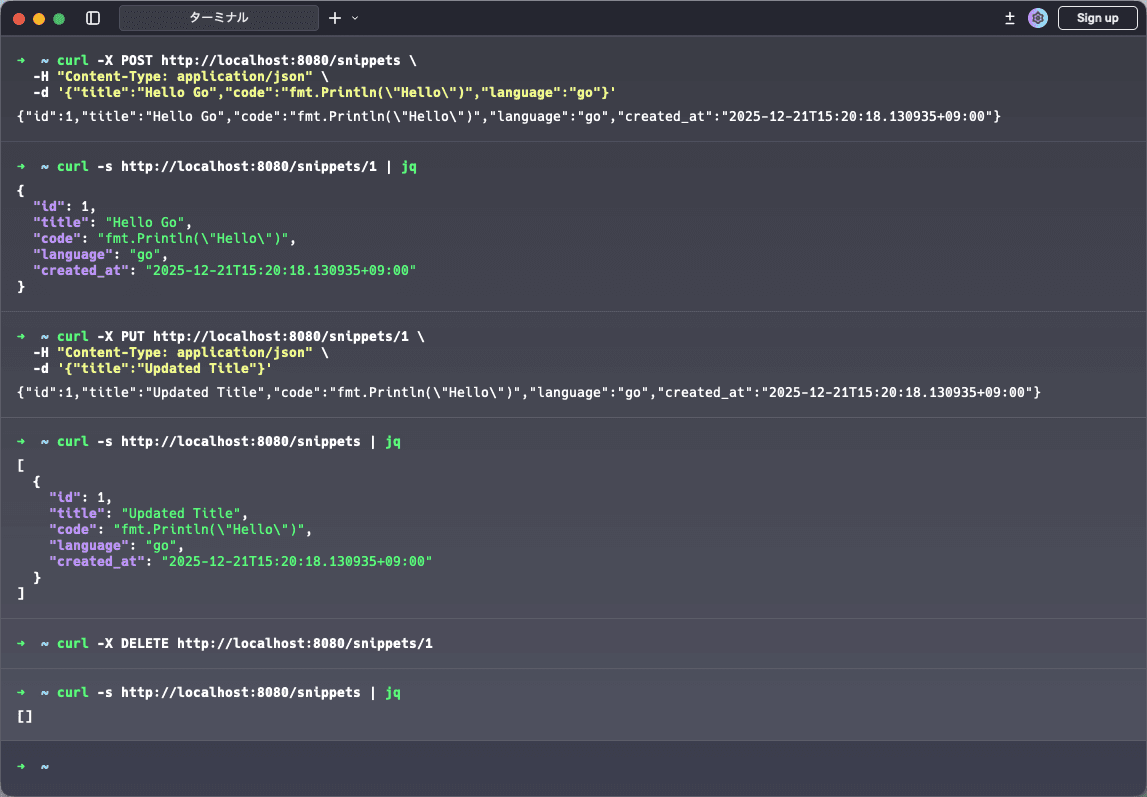
Step 5: エラーレスポンスの統一
現在はエラーを文字列で返していますが、もう少し構造化しましょう。
// エラーレスポンス用の構造体
type ErrorResponse struct {
Error string `json:"error"`
Message string `json:"message,omitempty"`
}
// エラーレスポンスを返すヘルパー関数
func respondError(w http.ResponseWriter, status int, message string) {
w.Header().Set("Content-Type", "application/json")
w.WriteHeader(status)
json.NewEncoder(w).Encode(ErrorResponse{Error: http.StatusText(status), Message: message})
}
// JSONレスポンスを返すヘルパー関数
func respondJSON(w http.ResponseWriter, status int, data any) {
w.Header().Set("Content-Type", "application/json")
w.WriteHeader(status)
json.NewEncoder(w).Encode(data)
}これを使うと、ハンドラーがスッキリします。
エラーレスポンス:
// Before
http.Error(w, `{"error":"Invalid ID"}`, http.StatusBadRequest)
// After
respondError(w, http.StatusBadRequest, "Invalid ID")成功レスポンス:
// Before
w.Header().Set("Content-Type", "application/json")
w.WriteHeader(http.StatusCreated)
json.NewEncoder(w).Encode(snippet)
// After
respondJSON(w, http.StatusCreated, snippet)Step 6: テストを書く
APIができたら、テストを書きましょう。Goのnet/http/httptestパッケージを使います。
package main
import (
"bytes"
"encoding/json"
"net/http"
"net/http/httptest"
"testing"
)
// テスト前にデータをリセットするヘルパー関数
func resetTestData() {
mu.Lock()
snippets = make(map[int]Snippet)
nextID = 1
mu.Unlock()
}
// テスト用のスニペットを作成するヘルパー関数
func createTestSnippet(title, code, language string) Snippet {
mu.Lock()
defer mu.Unlock()
snippet := Snippet{
ID: nextID,
Title: title,
Code: code,
Language: language,
}
snippets[nextID] = snippet
nextID++
return snippet
}
func TestHealthHandler(t *testing.T) {
req := httptest.NewRequest("GET", "/health", nil)
rec := httptest.NewRecorder()
healthHandler(rec, req)
if rec.Code != http.StatusOK {
t.Errorf("expected status %d, got %d", http.StatusOK, rec.Code)
}
var response map[string]string
json.NewDecoder(rec.Body).Decode(&response)
if response["status"] != "ok" {
t.Errorf("expected status 'ok', got '%s'", response["status"])
}
}
func TestListSnippets(t *testing.T) {
resetTestData()
createTestSnippet("Test1", "code1", "go")
createTestSnippet("Test2", "code2", "python")
req := httptest.NewRequest("GET", "/snippets", nil)
rec := httptest.NewRecorder()
listSnippets(rec, req)
if rec.Code != http.StatusOK {
t.Errorf("expected status %d, got %d", http.StatusOK, rec.Code)
}
var result []Snippet
json.NewDecoder(rec.Body).Decode(&result)
if len(result) != 2 {
t.Errorf("expected 2 snippets, got %d", len(result))
}
}
func TestGetSnippet(t *testing.T) {
resetTestData()
created := createTestSnippet("Test", "code", "go")
req := httptest.NewRequest("GET", "/snippets/1", nil)
req.SetPathValue("id", "1")
rec := httptest.NewRecorder()
getSnippet(rec, req)
if rec.Code != http.StatusOK {
t.Errorf("expected status %d, got %d", http.StatusOK, rec.Code)
}
var snippet Snippet
json.NewDecoder(rec.Body).Decode(&snippet)
if snippet.Title != created.Title {
t.Errorf("expected title '%s', got '%s'", created.Title, snippet.Title)
}
}
func TestGetSnippetNotFound(t *testing.T) {
resetTestData()
req := httptest.NewRequest("GET", "/snippets/999", nil)
req.SetPathValue("id", "999")
rec := httptest.NewRecorder()
getSnippet(rec, req)
if rec.Code != http.StatusNotFound {
t.Errorf("expected status %d, got %d", http.StatusNotFound, rec.Code)
}
}
func TestCreateSnippet(t *testing.T) {
resetTestData()
body := `{"title":"Test","code":"test code","language":"go"}`
req := httptest.NewRequest("POST", "/snippets", bytes.NewBufferString(body))
req.Header.Set("Content-Type", "application/json")
rec := httptest.NewRecorder()
createSnippet(rec, req)
if rec.Code != http.StatusCreated {
t.Errorf("expected status %d, got %d", http.StatusCreated, rec.Code)
}
var snippet Snippet
json.NewDecoder(rec.Body).Decode(&snippet)
if snippet.Title != "Test" {
t.Errorf("expected title 'Test', got '%s'", snippet.Title)
}
}
func TestCreateSnippetValidation(t *testing.T) {
resetTestData()
body := `{"code":"test code"}`
req := httptest.NewRequest("POST", "/snippets", bytes.NewBufferString(body))
req.Header.Set("Content-Type", "application/json")
rec := httptest.NewRecorder()
createSnippet(rec, req)
if rec.Code != http.StatusBadRequest {
t.Errorf("expected status %d, got %d", http.StatusBadRequest, rec.Code)
}
}
func TestUpdateSnippet(t *testing.T) {
resetTestData()
createTestSnippet("Original", "code", "go")
body := `{"title":"Updated"}`
req := httptest.NewRequest("PUT", "/snippets/1", bytes.NewBufferString(body))
req.SetPathValue("id", "1")
req.Header.Set("Content-Type", "application/json")
rec := httptest.NewRecorder()
updateSnippet(rec, req)
if rec.Code != http.StatusOK {
t.Errorf("expected status %d, got %d", http.StatusOK, rec.Code)
}
var snippet Snippet
json.NewDecoder(rec.Body).Decode(&snippet)
if snippet.Title != "Updated" {
t.Errorf("expected title 'Updated', got '%s'", snippet.Title)
}
}
func TestUpdateSnippetNotFound(t *testing.T) {
resetTestData()
body := `{"title":"Updated"}`
req := httptest.NewRequest("PUT", "/snippets/999", bytes.NewBufferString(body))
req.SetPathValue("id", "999")
req.Header.Set("Content-Type", "application/json")
rec := httptest.NewRecorder()
updateSnippet(rec, req)
if rec.Code != http.StatusNotFound {
t.Errorf("expected status %d, got %d", http.StatusNotFound, rec.Code)
}
}
func TestDeleteSnippet(t *testing.T) {
resetTestData()
createTestSnippet("ToDelete", "code", "go")
req := httptest.NewRequest("DELETE", "/snippets/1", nil)
req.SetPathValue("id", "1")
rec := httptest.NewRecorder()
deleteSnippet(rec, req)
if rec.Code != http.StatusNoContent {
t.Errorf("expected status %d, got %d", http.StatusNoContent, rec.Code)
}
// 削除されたことを確認
mu.RLock()
_, exists := snippets[1]
mu.RUnlock()
if exists {
t.Error("snippet should be deleted")
}
}
func TestDeleteSnippetNotFound(t *testing.T) {
resetTestData()
req := httptest.NewRequest("DELETE", "/snippets/999", nil)
req.SetPathValue("id", "999")
rec := httptest.NewRecorder()
deleteSnippet(rec, req)
if rec.Code != http.StatusNotFound {
t.Errorf("expected status %d, got %d", http.StatusNotFound, rec.Code)
}
}テスト実行:
go test -v実行結果:
=== RUN TestHealthHandler
--- PASS: TestHealthHandler (0.00s)
=== RUN TestListSnippets
--- PASS: TestListSnippets (0.00s)
=== RUN TestGetSnippet
--- PASS: TestGetSnippet (0.00s)
=== RUN TestGetSnippetNotFound
--- PASS: TestGetSnippetNotFound (0.00s)
=== RUN TestCreateSnippet
--- PASS: TestCreateSnippet (0.00s)
=== RUN TestCreateSnippetValidation
--- PASS: TestCreateSnippetValidation (0.00s)
=== RUN TestUpdateSnippet
--- PASS: TestUpdateSnippet (0.00s)
=== RUN TestUpdateSnippetNotFound
--- PASS: TestUpdateSnippetNotFound (0.00s)
=== RUN TestDeleteSnippet
--- PASS: TestDeleteSnippet (0.00s)
=== RUN TestDeleteSnippetNotFound
--- PASS: TestDeleteSnippetNotFound (0.00s)
PASS
ok snippetapi 0.372s▶テストのポイント
| 関数 | 説明 |
|---|---|
httptest.NewRequest | テスト用のHTTPリクエストを作成 |
httptest.NewRecorder | レスポンスを記録するRecorderを作成 |
req.SetPathValue | パスパラメータを設定(Go 1.22) |
今回は各APIごとに個別のテスト関数を書きましたが、Goにはテーブル駆動テストという手法があります。複数のテストケースを1つの関数でまとめて実行できるので、コードの重複を減らせます。テーブル駆動テストについては、別の記事で詳しく紹介する予定です。
完成コード
Step 1〜6を適用した最終的なコードです。
完成コードは以下のGitHubリポジトリからダウンロードできます。
まとめ
この記事では、Go標準ライブラリを使ったREST API開発の基礎を学びました。
学んだこと:
encoding/jsonによるJSON処理(Marshal/Unmarshal)- 構造体タグによるJSONフィールド名の指定
- RESTfulなエンドポイント設計
- CRUDエンドポイントの実装
net/http/httptestを使ったAPIテスト
前回のHTMLテンプレートと合わせれば、Goの標準ライブラリでWebアプリの基礎はバッチリですね。個人的には、外部ライブラリなしでここまでシンプルに書けるGoの設計思想が好きです。
次のステップ:
- データベース(PostgreSQL)との連携
- 認証・認可の実装
- Ginなどのフレームワークへの移行
▶参考リンク
この記事はいかがでしたか?
もしこの記事が参考になりましたら、
高評価をいただけると大変嬉しいです!
皆様からの応援が励みになります。ありがとうございます! ✨

エンジニア歴10年以上。Rust / Go / React / Python を中心にWeb開発しています。
日々の学びや技術的な知見をこのブログで発信しています。